Basic Blog

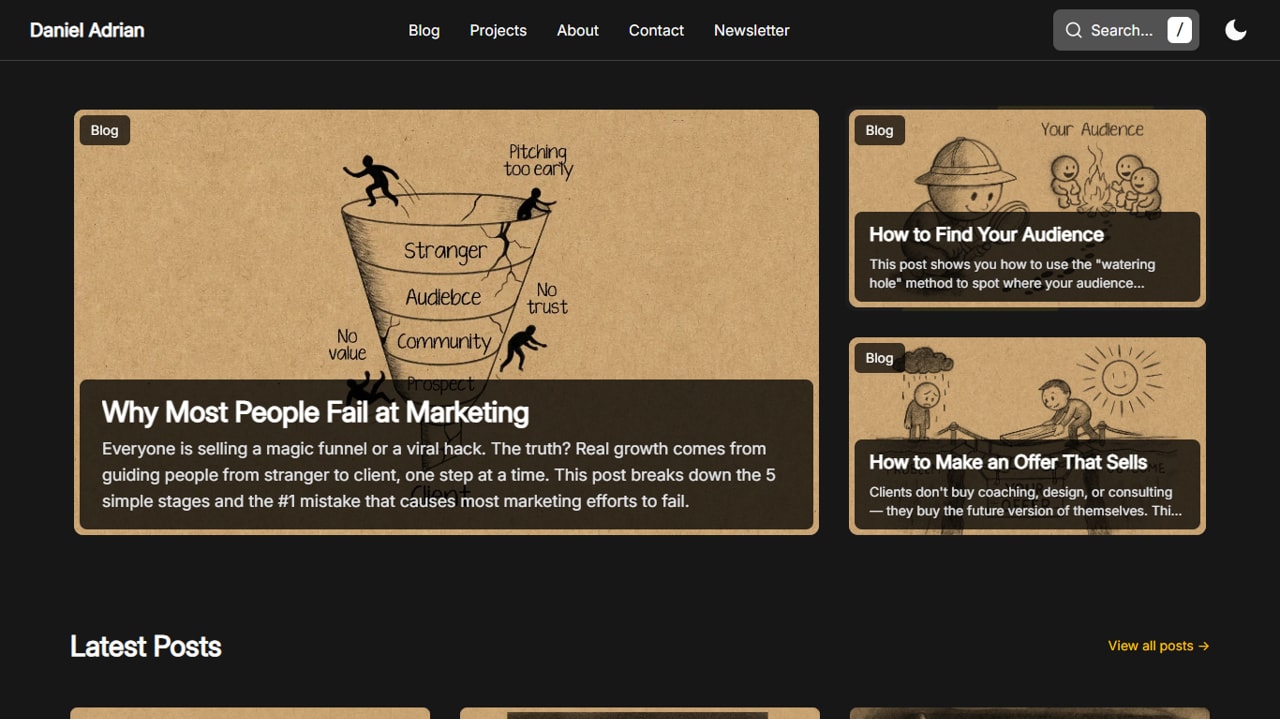
Basic Blog is a mostly lightweight, high-performance blog template built with Astro 6.
Features
- Astro 6+ Ready:
- Native Font Optimization
- Pre-configured CSP (Content Security Policy) and security headers (optimized for Cloudflare, easily adaptable for Vercel or Netlify).
- Responsive: mobile, tablet, and desktop devices.
- Stack: Astro, Tailwind, and JS.
Deployment
You will find a _headers file located in the /public folder. This file handles the Content Security Policy (CSP) and XSS protections mainly for Cloudflare.
If you are deploying to Vercel or Netlify, simply move these rules to a vercel.json or netlify.toml file respectively.
Configuration
Environment Variables
For forms to work, you must add your Turnstile keys to your .env file:
PUBLIC_CLOUDINARY_CLOUD_NAME=your_cloud_name_herePUBLIC_TURNSTILE_SITE_KEY=0x4AAAAAA...Site Settings & SEO
Global settings, SEO metadata, and navigation links are managed in src/site.config.ts.
Update SITE_SETTINGS to change your site title, description, and social media handles:
export const SITE_SETTINGS = { title: "Daniel Adrian's site", description: "A space to explore ideas and share what I'm learning", owner: "Daniel Adrian", ogImages: "https://res.cloudinary.com/dellp9a4z/image/upload/v1756758385/og-home_ejuqq8.png", socials: [ { icon: "github", label: "GitHub", url: "https://github.com/truedaniyyel", handle: "truedaniyyel", }, ],};Navigation (Header & Footer)
You can easily manage your site’s menu structure by editing the header and footer exports:
export const header = [ { name: "Blog", url: "/blog", }, { name: "Projects", url: "/projects", }, { name: "About", url: "/about", }, { name: "Contact", url: "/contact", }, { name: "Newsletter", url: "/newsletter", },];
export const footer = [ { title: "Content", links: [ { name: "Search", url: "/search", }, { name: "Blog", url: "/blog", }, { name: "Projects", url: "/projects", }, { name: "About", url: "/about", }, ], }, { title: "Resources", links: [ { name: "Contact", url: "/contact", }, { name: "Newsletter", url: "/newsletter", }, { name: "RSS", url: "/rss.xml", }, { name: "Sitemap", url: "/sitemap-index.xml", }, ], },];Metadata & OG Images
You can define custom Open Graph images for both static pages and posts.
For Static Pages
Pass the ogImage prop directly into the <BaseLayout> component:
<BaseLayout title="Search" description="Search articles and projects from Daniel Adrian." ogImage="https://res.cloudinary.com/.../og-search.png"> </BaseLayout>For Blog Posts
Add the image details to the Frontmatter of your Markdown files. The template will automatically use this for the post’s social sharing card:
image: src: "https://res.cloudinary.com/.../how_to_build_trust.webp" alt: "A hand-drawn sketch representing stability with labels: 'Know', 'Like', and 'Trust'."ogImage: src: "https://res.cloudinary.com/.../how_to_build_trust.webp"Image Optimization
This template uses Cloudinary paired with LQIP (Low-Quality Image Placeholders) to ensure a smooth loading experience. When an image is requested, a blurred placeholder is shown until the full-resolution image is ready.
You can find the implementation logic in src/components/ui/OptimizedImage.astro:
<div class={cn( "relative overflow-hidden bg-neutral-200 dark:bg-neutral-700", wrapperClass, )}> { lqipUrl && ( <img data-pagefind-ignore src={lqipUrl} alt="" aria-hidden="true" class={cn( "absolute inset-0 h-full w-full scale-105 object-cover blur-xl", imageClass, )} loading="eager" decoding="async" /> ) }
<CldImage src={src} alt={alt} class={cn("absolute inset-0 h-full w-full object-cover", imageClass)} loading={loading} fetchpriority={fetchPriorityVal} format="auto" quality="auto" {...rest} /></div>Fonts
Local fonts are stored in src/assets/fonts/. To add or change fonts:
- Drop your
.woff2files into the fonts folder. - Update the
astro.config.mjsfont provider:
fonts: [ { provider: fontProviders.local(), name: "YourFontName", cssVariable: "--font-custom", options: { variants: [{ src: ["./src/assets/fonts/YourFont.woff2"], weight: "normal", style: "normal", }], }, }, ],- Update the variable in
src/styles/global.css:
font-family: var(--font-custom), system-ui, sans-serif;For more info on using remote fonts (Google Fonts, etc.), check the Astro Font Provider Reference.
Forms & Bot Protection
The template uses Cloudflare Turnstile for non-intrusive bot protection and Astro Actions for server-side processing.
Newsletter Subscription
Handled via utils/client-newsletter.ts. It uses AJAX to submit the form without refreshing the page, providing instant feedback and resetting the Turnstile widget upon success.
Contact Form
Located in src/pages/contact.astro.
- State Persistence: Includes a script that caches form data in
sessionStorage. If the user refreshes or a validation fails, their message isn’t lost. - Success Handling: Automatically redirects to a success state and clears the cache once the message is sent.
Turnstile Implementation
Turnstile code is in src/components/integrations/turnstile/:
TurnstileWidget.astro: The UI component that renders the challenge.TurnstileController.astro: Manages the lifecycle of the widget, including theme switching (light/dark) and automatic cleanup/re-initialization.
Server-Side Actions
To make the newsletter and contact form functional, you must:
- Uncomment
export const prerender = false;in the respective page files (if using SSR). - Create
src/actions/index.tsto define your logic.
Implementation Example (Resend & Kit)
Note: I’m not a pro with this specific setup yet, so take this with a grain of salt.
import { ActionError, defineAction } from 'astro:actions';import { z } from "astro/zod";import { escapeHtml } from '@utils/escapeHtml';import { stripCtl } from '@utils/stripCtl';import { Resend } from 'resend';
const resend = new Resend(import.meta.env.RESEND_API_KEY);
const KIT_FORM_ID = import.meta.env.KIT_FORM_ID;const KIT_API_KEY = import.meta.env.KIT_API_KEY;
const TURNSTILE_SECRET = import.meta.env.TURNSTILE_SECRET_KEY;
const turnstileField = import.meta.env.DEV ? z .string() .optional() .default('') // dev: missing → '' : z.string().min(1); // prod: must be non-empty
const fetchWithTimeout = async (url: string, init: RequestInit = {}, ms = 8000) => { const controller = new AbortController(); const t = setTimeout(() => controller.abort(), ms); return fetch(url, { ...init, signal: controller.signal }).finally(() => clearTimeout(t));};
async function verifyTurnstile(token: string, remoteip?: string, expectAction?: string) { if (import.meta.env.DEV) return true; if (!TURNSTILE_SECRET) { console.error('TURNSTILE_SECRET_KEY missing'); return false; }
const body = new URLSearchParams({ secret: TURNSTILE_SECRET, response: token, ...(remoteip ? { remoteip } : {}), });
const res = await fetchWithTimeout('https://challenges.cloudflare.com/turnstile/v0/siteverify', { method: 'POST', headers: { 'content-type': 'application/x-www-form-urlencoded' }, body, }).catch((err) => { console.warn('Turnstile verify fetch failed/aborted', err); return undefined; });
if (!res || !res.ok) { console.warn('Turnstile verify non-OK', res?.status); return false; }
type VerifyResp = { success: boolean; hostname?: string; 'error-codes'?: string[]; action?: string; cdata?: string; challenge_ts?: string; };
const json = (await res.json().catch(() => ({}))) as VerifyResp;
if (!json.success) { console.warn('Turnstile failed', json); return false; }
if (expectAction && json.action && json.action !== expectAction) { console.warn('Unexpected action', json.action); return false; }
return true;}
function getRemoteIp(request: Request): string | undefined { const h = request.headers; return ( h.get('CF-Connecting-IP') ?? h.get('x-real-ip') ?? h.get('x-forwarded-for')?.split(',')[0]?.trim() ?? undefined );}
export const server = { contact: defineAction({ accept: 'form', input: z.object({ name: z.string().min(1).max(100), email: z.string().email().max(254), message: z.string().min(1).max(5000), 'cf-turnstile-response': turnstileField, }), handler: async ({ name, email, message, 'cf-turnstile-response': token }, ctx) => { const remoteip = getRemoteIp(ctx.request);
const ok = await verifyTurnstile(token, remoteip, 'contact'); if (!ok) { throw new ActionError({ code: 'BAD_REQUEST', message: 'Turnstile verification failed.' }); }
const safeName = stripCtl(name); const safeEmail = stripCtl(email);
const escapeName = escapeHtml(safeName); const escapeEmail = escapeHtml(safeEmail); const escapeMessage = escapeHtml(message).replace(/\n/g, '<br>');
try { const { data, error } = await resend.emails.send({ subject: `New Contact Form Submission from ${safeName}`, replyTo: `${safeName} <${safeEmail}>`, html: ` <p>You have a new contact form submission:</p> <p><strong>Name:</strong> ${escapeName}</p> <p><strong>Email:</strong> <a href="mailto:${escapeEmail}">${escapeEmail}</a></p> <p><strong>Message:</strong></p> <p>${escapeMessage}</p> <p style="color:#666">Sent from truedaniyyel.com</p> `, text: 'You have a new contact form submission:\n\n' + `Name: ${safeName}\n` + `Email: ${safeEmail}\n\n` + `Message:\n${messag}\n` + '— Sent from truedaniyyel.com', });
const id = data?.id;
if (error || !id) { console.error('Resend failed', { error, data }); throw new ActionError({ code: 'BAD_REQUEST', message: 'Email could not be sent.', }); }
console.info('Mail sent', { id });
return { ok: true }; } catch (error) { console.error('Action error', error); throw new ActionError({ code: 'INTERNAL_SERVER_ERROR', message: 'Email could not be sent.', }); } }, }),
newsletterSubscribe: defineAction({ accept: 'form', input: z.object({ email: z.string().email().max(254), 'cf-turnstile-response': turnstileField, }), handler: async ({ email, 'cf-turnstile-response': token }, ctx) => { const remoteip = getRemoteIp(ctx.request);
const ok = await verifyTurnstile(token, remoteip, 'newsletter'); if (!ok) { throw new ActionError({ code: 'BAD_REQUEST', message: 'Turnstile verification failed.' }); }
if (!KIT_API_KEY || !KIT_FORM_ID) { console.error('Kit env missing', { hasKey: Boolean(KIT_API_KEY), hasFormId: Boolean(KIT_FORM_ID), }); throw new ActionError({ code: 'INTERNAL_SERVER_ERROR', message: 'Subscription failed.', }); }
const email_address = stripCtl(email);
const headers = { 'Content-Type': 'application/json', 'X-Kit-Api-Key': KIT_API_KEY, };
try { const upsertRes = await fetchWithTimeout('https://api.kit.com/v4/subscribers', { method: 'POST', headers, body: JSON.stringify({ email_address }), }); const upsertJson = await upsertRes.json().catch(() => ({})); if (!upsertRes.ok) { console.error('Kit upsert failed', { status: upsertRes.status, upsertJson }); throw new ActionError({ code: 'BAD_REQUEST', message: 'Subscription failed.' }); }
const attachRes = await fetchWithTimeout( `https://api.kit.com/v4/forms/${KIT_FORM_ID}/subscribers`, { method: 'POST', headers, body: JSON.stringify({ email_address }), }, ); const attachJson = await attachRes.json().catch(() => ({})); if (!attachRes.ok) { console.error('Kit form attach failed', { status: attachRes.status, attachJson }); throw new ActionError({ code: 'BAD_REQUEST', message: 'Subscription failed.' }); }
return { ok: true }; } catch (error) { console.error('Newsletter action error', error); throw new ActionError({ code: 'INTERNAL_SERVER_ERROR', message: 'Subscription failed.', }); } }, }),};Technical Details
Search: Powered by Pagefind for fast, static search.
Image Zoom: Integrated with medium-zoom for a clean light-box experience.
Icons: Handled via astro-icon.
Code Blocks: Rendered using astro-expressive-code.
Biến ý tưởng thành trải nghiệm thực tế.
Auck Stamp giúp bạn bắt đầu chương trình khách hàng thân thiết bằng thẻ tem điện tử, quét QR nhanh và không yêu cầu khách tải app.
Trao đổi cùng Auck Stamp